Picking Apart the Steam Deck
Tuesday, Jul 25, 2023
Show Notes
In this episode:
- Mark is repairing a Steam Deck
- Alan is taking digital hoarding too far with Tube Archivist
- Martin is creating a magical LAN using the Internet with ZeroTier
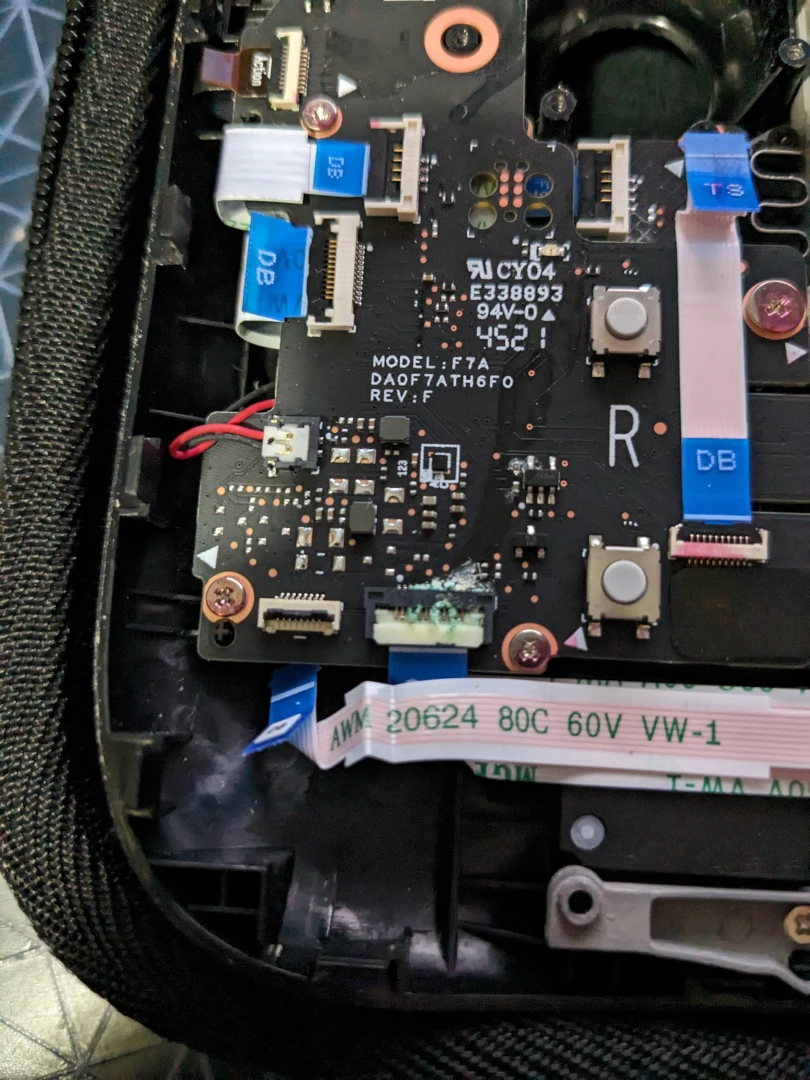
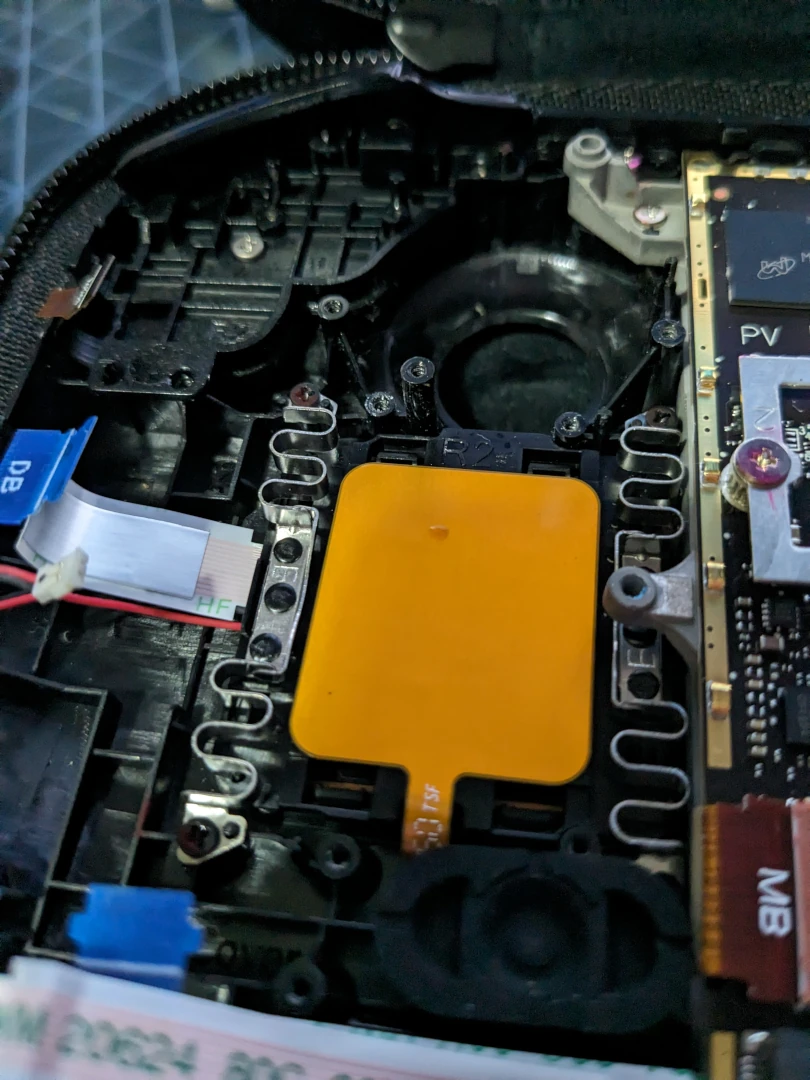
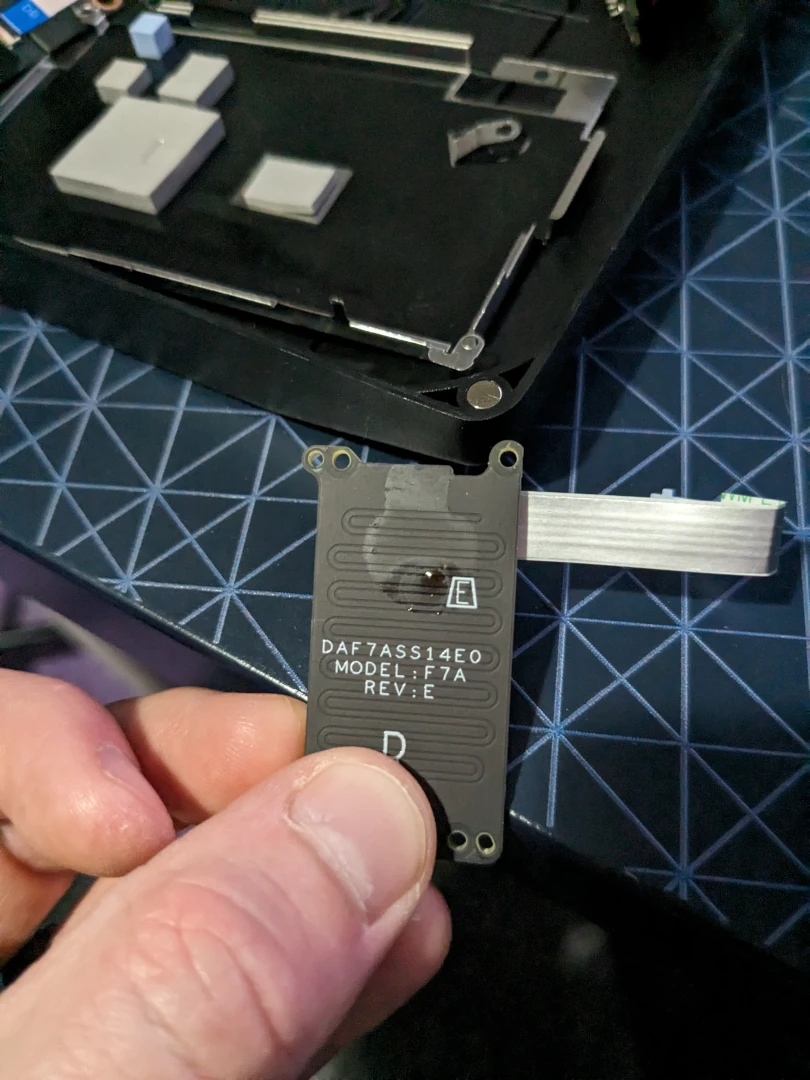
Some pictures of the state inside Mark’s Steam Deck
- The interior of a Steam Deck showing a PCB with a corroded connector
- The back of a Steam Deck’s touchpad showing sticky residue
- The touch pad PCB from a Steam Deck showing sitcky residue coating the sensor
You can send your feedback via show@linuxmatters.sh or the
Contact Form. If you’d like to hang out with other listeners and share your feedback with the community, you can
join us on:
- The Linux Matters Chatters on Telegram.
- The Linux Matters Subreddit.
If you enjoy the show, please consider supporting us.
Transcript
Mark Johnson 0:03
I’ve been poking around inside my Steam deck this week. They weren’t
Mrs.
Alan Pope 0:07
Did you break it?
Mark Johnson 0:08
It wasn’t in great shape. I’m not sure exactly what I did. But
sometime near when I got it, I must have spilled something on it. I have a vague memory of very, very
briefly spilling something on it, wiping it off and take it out be fine.
Martin Wimpress 0:23
Had you been drinking Sherry at the time, something similar perhaps?
Mark Johnson 0:27
Certainly something a bit sticky. So maybe some sort of carbonated beverage or
similar.
Alan Pope 0:32
It’s a good job. This isn’t a video podcast because the looks on my and
Martin’s faces as you’ve been describing this is not pretty. Yeah.
Mark Johnson 0:39
So the upshot of this was I realised a couple of months ago, as I was playing a
game and I pressed in my right trackpad. It made the most cringeworthy squelching noise and would get
stuck. And would you end up with whatever button was bound to that permanently on. And it just got to
the point where I just did not want to touch it for fear of what would happen.
Alan Pope 1:05
This is super grim. This is I’m hoping for a very happy outcome at the end of
this.
Martin Wimpress 1:11
This sounds expensive. Yeah,
Mark Johnson 1:13
yeah. So because I’ve been playing a game not with my Steam deck,
I’ve actually been playing Breath of the Wild on the Nintendo Switch, which isn’t relevant
to this podcast. So that means that my Steam deck is out of action for a while. So I thought this is the
perfect time to open it up and see if there’s something I can do about it. So I bought a repair
kit from I fix it, because they’ve got loads of guides about opening up and replacing parts in the
steam deck, and they have a guide for how to replace the right trackpad. Now, I was hoping that I
wouldn’t actually have to replace the trackpad, I would just be able to have a look and see what
was going on. So I follow the steps, it was actually really good and really satisfying just to do the
dismantling, because it’s really well put together, the guide is excellent. And everything’s
really well engineered so that you can do this.
Martin Wimpress 2:06
Yeah. And when this was one of the early sort of features of the steam deck,
you know, before they were reviewed, and before they were out in the wild, they made quite the sort of
play for were taking this right to repair and service ability very seriously with the steam deck. And I
think they released their own sort of tear down video,
Mark Johnson 2:26
it was a bit of a funny one, it was like, here’s how easy it is to do.
Don’t do this. Yeah. And then I Fix It got a bit grumpy about that with them. And I think
they’re in there a bit better about it now. So the first thing I discovered was the steam deck has
this thing called battery storage mode, where if you are not going to use it for a while, or if
you’re going to open it up and start poking inside, it can basically put it in super, super low
power mode where it won’t turn on at all unless you plug in the charger. So that’s the first
thing I did, I went into the sort of bootloader menu and put it into that took the back off, which was a
few screws and then sliding an opening pick around sort of where the trigger is to get in around the
edge. And once you go down one inch, the whole back pops off nice and easily. unplugging the battery, I
found was a bit fiddly, because everything’s very tightly packed, there’s no slack on any of
the cables at all. But what they do have is they’ve each got a nice little tab that sticks out
from the cable. And so you you’ve got something to pull on with all of them and you know, various
tools in in the right places and everything came apart.
Alan Pope 3:27
Plus you’ve got a video guide telling you exactly how to unplug each of these
cables, I imagine Yes, right. Yeah, well,
Mark Johnson 3:32
at least photos show you what’s where and what you need to do.
Martin Wimpress 3:36
So at this point where you’ve got cables exposed, and you can see
there’s little to no wiggle room, how are your stress levels at this point, now you’ve sort
of got the thing open,
Mark Johnson 3:47
it was a bit fiddly and a bit stressful. I will I will admit, I mean, it’s
really interesting seeing inside compared to like a phone or a laptop, because it’s quite a thick
device. And there’s layers to it as you go down. Let’s like a bit of a lasagna of PCBs in
there. So I think I actually to get from the back of the machine to the touchpad at the front. I think I
had to take off for PCBs, which were laying it up well, each with its own set of screws, and also a lot
of them are mounted. There’s like little plastic posts mounted on a corner. That’s always a
worry Exactly. So you unscrew everything you like great. And then you pick it up in like, oh, oh,
that’s not coming. And so you have to try and lever it. So it’s coming out flat, and
you’re not going to snap the post, but I did eventually managed to get around it. And I think I
found on a board that this teardown guide describes as the button board. I found there was some
corrosion around one of the connectors, which was my first sign of trouble under sort of streak of some
sort of liquid across the board. But considering that it hadn’t caused any kind of other
noticeable electrical problems. It just obviously been sitting there for a while. So I managed to take
that out and I cleaned that up with some isopropyl alcohol, and managed to get it looking all nice. And
then I kept going down. And what I found was, you’ve got the touchpad, which is mounted on two
springs. And then behind that you’ve got a board which it I guess there’s a sensor in there
for how much it’s pressed against it or something, as well as the capacitive sensor in the
touchpad itself.
Alan Pope 5:22
This is the origin of the squelch. Yes, there was basically a blob of sticky, gooey,
lasagna probably. Yeah, it was sort of
Mark Johnson 5:31
dried on but it was just sitting on the on the sensor. And so it was quite
obvious that that’s what it what was happening, I had to take it apart and clean it and then put
it back together a few times. There was also sort of once you’ve taken the touchpad off around the
rim of the case where it sits, there was also some residue around there. What I was a bit worried about
was the springs, I was assuming that they got gummed up with something, but they were absolutely fine.
But it does warn you in the guide. They’re quite sort of sensitive. So I had to be really careful
with them, you can feel they give quite easily. And it did make it quite difficult putting it back
together and trying to tell if it was the same as the one I hadn’t dismantled, right, because
until you’ve got it back on and you’ve got the haptics on, it doesn’t really feel how
it’s going to feel right. So I had to sort of make sure that it wasn’t sticking, make sure
it felt about right, and then just you know, put it back together and hope. And it worked. Once I got it
I it took a good while getting it properly clean and put it all back together by just reversing exactly
what I’d done. And yeah, it went really well.
Alan Pope 6:31
You say a good while was sort of duration,
Mark Johnson 6:34
I probably spent probably about 10 minutes sort of cleaning just into we’re
talking about a sort of postage stamp size area of board. So you know, just reapplying the cleaning
fluid and scrubbing off making sure it was dry. See if there was anything left. See if there was
anything else around.
Martin Wimpress 6:52
And you mentioned earlier that the cables are sort of made to measure. Yeah,
did you have any difficulty reconnecting those during the reassembly.
Mark Johnson 7:00
It wasn’t as bad as I was expecting. There was a few tricky bits where you
have to you have something that comes up around the board and then into a connector and you’ve got
to make sure you lay everything in exactly the right place before you put the board in place. What was
actually tricky was what I did next, which was I then went on to replace the fan. Oh right. Oh, because
I thought while I was in there, I’d also ordered a replacement fan because mine was one of the
noisy fans if you’re familiar with reviews of the steam deck, some of them have a an OK fan and
some of them have a noisy fan. And I was unlucky enough to get the noisy one. So once I put all that
back together, remove a couple of screws on the fan itself. There’s then for some reason, a
sticker holding the fan to the heatsink, which was a bit of a suboptimal choice for a home repair
because then you’ve got to very carefully unstick this sticker without it tearing, which I did
manage. But reattaching the cable once I put the new fan in was actually the fiddly bit of the whole
thing because it’s a really small connector. And again, small, the best to tie exactly very little
slack. So yeah, getting that around and getting it in without pulling anything too much was was a bit
tricky. But that has made the world of difference. It’s gone from a whine to what I would I best
describe as a loud whisper, right? Certainly not solid. Anyone who tells you any fan is silent is just
lying. Yeah, Mesa kind of whooshing noise. Yeah, you’ve probably got a good one, then I’d
say it’s yeah, it’s like, right. I won’t try and irritate it now. Because our
listeners don’t want to hear
Martin Wimpress 8:27
that. Yeah. fan noise is more about the tone than anything, isn’t it
exactly. Whether you find it tolerable or not.
Mark Johnson 8:34
More importantly, whether my partner sitting next to me on the sofa in the
evening finds it tolerable, because I can just put headphones on.
Alan Pope 8:41
So all in all, the whole process of you buying stuff you said you got it from my
fix. It didn’t have to come from the state sort of account from Europe. Was there import tax and
stuff or anything?
Mark Johnson 8:50
No. All the all the tax and stuff was sorted, I think but yeah, I think it
shipped from Europe was the impression I got it took about a week to arrive
Alan Pope 8:59
to me asking how much it costs for how much you spent for the fan and the
replacement touchpad or whatever it’s
Mark Johnson 9:05
called. So I didn’t I didn’t get a replacement touchpad. I just Oh,
you just right. Yeah. So the fan, they sell it either by itself or with a kit with just the tools you
need to go in and do it. I think the fan itself is about 20 pounds. And with the kit, it’s about
2530. But I just bought the fan and I bought a separate larger kit because I knew I needed a couple of
extra bits to go all the way in and do the touchpad and I wanted some more tools. So I think that I
think the kit as well was somewhere in the region of 4050 pounds.
Martin Wimpress 9:41
So having gone through a repair of the steam deck, a repair and a let’s
call it an upgrade. How’d you feel that Valve have done in terms of their sort of mission to make
a serviceable? repairable device?
Mark Johnson 9:55
I would say extremely well. I mean considering how packed together everything is
in there and how the tolerances they working with try and make sure that everything was just so in terms
of the power and the heat dissipation and everything that they were trying to do in that. Also managing
to make it so that it you know, someone like me can just take bits out and put them back in and it all
works is I think they’ve done a really good job of it. And also, a big shout out to I fix it, who
their tools are really good. And the guides are really good there as well.
Alan Pope 10:27
I’m super concerned about doing something like this I, I hold my, my Steam
deck with kid gloves. And I’m very delicate with it. Because I know if something went wrong,
I’m such a ham fisted oath that I would break it if I took it apart. And I have, you know, taken
phones and other devices apart before to fix them or replace batteries or screens and stuff and
completely messed it up and ended up junking thing because I couldn’t miss precious device, this
precious precious gaming device. I don’t want to muck it up. So the fact that you’ve said it
is actually pretty straightforward for someone like yourself to take apart is good news.
Mark Johnson 11:06
Yes. And to be honest, if I hadn’t already mocked it up, I wouldn’t
have been attempting this. It was basically this was the least bad option. So I knew that I had to at
least know what was going on in there. I couldn’t carry on playing it with this going on.
Alan Pope 11:23
I think I’ve been taking digital holding a little bit too far. I discovered
an application called Tube archivist last week on Hacker News. And it’s a handy tool for archiving
YouTube channels.
Mark Johnson 11:41
What do you mean? Like as in downloading the whole thing?
Alan Pope 11:44
Yes. Exactly that. And you know, there are already tools like YouTube DL and
YouTube DLP and stuff like that, that can download individual videos and playlists. And you can point
them at like, lists of URLs and stuff, those those things do exist. But this is a nice web based
application. I think it’s a Django application under the covers, that has a nice, pretty front
end, where you can point it at a YouTube channel and download it for archival purposes. So for example,
if you’re a popular YouTuber, and you make videos, and you push them to YouTube, or you do live
streams, and they’re archived on YouTube, at some point, Google might say goodbye and close down
your channel. Or they might shut down YouTube, or any one of a number of reasons copyright strikes, or
whatever might mean that your videos go away, or access to your videos go away. So the goal of this
project is to allow people to archive their own YouTube channels onto their own machine. But
there’s other things you can do with it as well. And so I installed it and test it out. And it
works.
Martin Wimpress 12:55
So you say it’s a Django application. So my mind is immediately
thinking this is some sort of pretty web application. So does this mean you get something that looks
like a YouTube channel that you can look at in your web browser? Or does it just sort of dump all of the
thumbnails and videos and some text metadata and stuff?
Alan Pope 13:18
Why not both? Yes, it does all of that. Oh, so the way it works is you instal it on
a machine, I chucked it on my trusty home server, running Ubuntu 2204, I think. And once it’s
installed, which is pretty straightforward, the instructions just work. I use Docker, I’m not a
fan of Docker at all. But I happen to have Docker installed on that machine. And the instruction works,
I thought, Okay, well, that’s fine. Once you have it running, you can point your browser at it.
And yes, you get a web UI, in which you feed it a channel URL, like any YouTube channel URL, and it then
can go and grub through that channel, find all of the videos, gather all the thumbnails, all the
descriptions, the durations, the likes, and optionally, you can also gather the dislikes, and all of
that kind of metadata about the video that you would care about, if you wanted to archive your own
videos, you might want to know that kind of stuff. And then you can schedule downloads of the actual
videos, it doesn’t do it automatically straight away, you have to tell it to download the videos.
And then it will just go through creating a list of videos to download. And it will chug through them,
downloading them all to a directory that you specify in the config. And the second part of your
question. So the first part yes, it does download them all and creates all these metadata files and
you’ve got a cache of MP fours that easily understandable. There’s a folder with your
channel name and then there is a bunch of MP fours and the file format is date stamp underscore name of
video. description like the title of the video underscore, and then the YouTube idea of the video, dot
mp4, it’s pretty straightforward. It’s quite nicely done. But then there’s a web UI
where you can actually look at all the videos in that channel, and search as well. So you can search for
keywords, if you know you did a video on a particular topic, you can find that video in your archive,
and there’s a video player as well. So you could just click it, and it’ll pop the video up
directly off of your own storage locally, offline, if you wanted to archive your videos and be able to
watch them offline. You can totally do that. And that’s really nice. So I could host my own
version, my own archive of my YouTube channel, I could have a video archive.something.com I’m not
sure you would do that. Okay, for bandwidth and hosting, you know, consumption reasons, is not really
designed. As far as I can tell, for public access. You can, it’s got an admin interface where you
can create multiple users. So if there’s you and a bunch of friends who want to also access this
resource, you can give them all user IDs, and accounts where they can log in, and they can see the video
archive as well. Right. I don’t think it’s really designed for being a public way of
mirroring your YouTube. Okay, more for your personal archival data hoarding
Martin Wimpress 16:22
purposes? And did you need any sort of authentication keys or API keys in
order to do this? Or is that optional?
Alan Pope 16:30
Yes. And no, no, I didn’t need any keys because it uses YouTube DLP, and
other public API’s to get the names of the videos and the thumbnails. Those are all public
API’s. And you don’t need an API key for that. But I mentioned that it can go and get the
downvote. From videos now that it is hidden by the YouTube API by default, but there is an application,
I think it’s called Restore download, or something like that. And they have an API. And so if you
get an API key, you can put that in. That is optional, right? I don’t particularly care about
that. But that is something you could do. Yes. And the configuration is pretty straightforward. Once
it’s installed, there’s a config screen in the web UI, where you can tell it when you want
to periodically check. So if you’re, if you’re constantly doing live streams, and
you’ve got videos going on your in your YouTube archive, then maybe you want to overnight,
download those into your archive locally, I get this is a pretty niche use case. But that’s yeah,
that’s what it was designed for. Yeah, there are other use cases for it. Such as well, you can
point it at someone else’s YouTube channel, and then have to archive your own right. So for
example, I pointed it at your YouTube channel as a test to see if it would work. And sure enough, it
downloaded every video in your channel on YouTube. And that amounts to 74 gigabytes of disk space on my
server, you’re welcome. And I also downloaded my own, which amounts to just 30 gig of space. I did
that as a test to see you know, if it works. And it presents a user interface where you can sort by
various things, but most recently downloaded is useful. It’s a bit like the subscriber page on
YouTube itself, it shows you the most recent videos at the top. So if you did have this chugging away in
the background, downloading a couple of channels, then when you visit the page, you’re going to
see the most recent videos at the top. And if you’ve already watched them on YouTube, you can mark
them as already viewed and it’ll hide them right? Or you could just click through and watch them
in a video player that appears in your browser window. It’s quite neat.
Martin Wimpress 18:39
It does sound very useful. And is there any way if you’ve got your own
channel, can you coerce it to get your unlisted private videos as well? Or is it purely what is ever
publicly available?
Alan Pope 18:53
I don’t know that it’ll do that. Okay, I don’t see anywhere in
the config where you can tell it to get private stuff, or unlisted stuff? No, it only showed me public
videos interesting, which, you know, make sense. I don’t know, if you gave it a playlist, you can
feed it a playlist as well, or individual video URLs. So it could get them if they were unlisted, but
not as a private, obviously, because it doesn’t have any API to that, right. The other thing it
can do is if you already have an archive of the videos, if you’ve already downloaded a channel,
you can import them, it’s got like an import process to save, you re downloading them all over
again, like if you already used some other tools archive your channel, you could import the videos in,
which is quite neat, as well.
Mark Johnson 19:36
And is that just from a folder of mp4 files?
Alan Pope 19:40
Yeah. And you can also specify the metadata in a little file that goes alongside
it. So if you want to have all the titles and all of that kind of stuff, rather than just raw videos in
that, but yeah, it’s it’s pretty neat. It is a bit niche, but I thought it would be quite
handy if I ever did forget my youtube channel exists And my Google account gets shut down and goes away
and I care about those videos, then I can be sure I’ve got a copy on my on my server and
potentially re upload them to a new channel. Yeah, yeah, or even just like keep them for myself. As a
nice memory of me shouting at a robot, what are the
Mark Johnson 20:21
Linux matters is part of the late night Linux family. If you enjoy the show,
please consider supporting us on the rest of the late night Linux team using the PayPal or Patreon links
at Linux matters.sh/support. For $5 a month on Patreon, you can enjoy an ad free feed of our show, or
for $10 get access to all the late night Linux shows ad free, you can get in touch with us via email
show at Linux matters.sh, or chat with other listeners in our telegram group. All the details are at
Linux matters.sh/contact.
Martin Wimpress 20:55
I have created a magical LAN using the internet. Okay, so I’m going to
be talking about a bit of software called Zero tier. And I suspect that everything I say is probably
possible with tails scale. But I don’t know for sure, because I haven’t used tails scale to
the same extent. So I suppose I should start by explaining what tails scale and zero tear are. And from
this point onwards, I’m just going to talk about zero tear, because this is the thing that
I’ve really been tinkering with. So it’s at its heart of VPN. But it’s a VPN of your
own between your own devices. So it’s not one of these. I’m not going to say any brand
names, but let’s just say licence, violating copyright violating services, you know, which is
ostensibly how these VPN services are marketed these days, right? This is a VPN for you to be able to
connect from a machine that you’re on maybe my laptop to my home server, without having to
configure anything on my router. And this is the magical part about it. So you don’t have to open
any ports on your firewall, you don’t have to run any port address translation or static IP
addresses. And in fact, it is completely magical. And I’ll explain some of the magical properties.
Now, there may be some people listening to this who are zoning out thinking I’ve heard about this
tale scale, and zero tears filling a similar nation. This is not for me, you know, I’m home user
enthusiast, I don’t need these enterprise tools. Well, I’m here to tell you, I found loads
of ways to use this that I think everyone who’s a little bit nerdy with computers and networks
will absolutely love. Okay, I’m listening, I’m gonna go through some of what I’ve
done. So the first thing is, so I’ve used tail scale. And the only thing I’ve used it for in
the past is being able to connect to servers at work. That’s what I’ve used it for. But I
was using it for my own stuff, but work use tail scale. So I had to use my tail scale instances on my
hosts in order to be part of the work network. But I needed a way to persist my own way of connecting to
all of my devices. So this is why I started using zero tear alongside tail scale.
Alan Pope 23:22
Sorry, for the confused and asking half of a confused person. You’re saying
this, because you’ve already got a tail scale setup, which is connecting to work, and you want to
connect to other systems that you own on other locations. But you can’t have two tailed scales at
the same time. Is that what you’re basically saying exactly what I’m saying,
Martin Wimpress 23:43
right? Oh, yes. Now what you can have is multiple zero tears at the same
time. Now I haven’t done that, because I haven’t needed to. So I will explain some scenarios
where I have used zero tear. So the simplest is I have an office here at home, which I’m talking
to you from now with a workstation. And I have a another office in town with a another workstation. That
office in town is a colocation co working space. I have no jurisdiction over the firewalls or the
networks or anything like that. And in fact, my PC there is connected to a Wi Fi network. Every host is
isolated, it’s all locked down. But I am able to ssh from here to that workstation over an IP
address, which is a 192168, local area network address. And I can just connect from here to there. And
from there to here, and it’s magical property is it figures out how to punch holes in all of the
right places in order to make those connections happen.
Alan Pope 24:48
You said there’s no public IP with a public open port so other people
can’t port scan that machine inside that office.
Martin Wimpress 24:56
Correct. Right. Okay. That was really useful for me because it When I could,
for example, the next way that I’m using this is, once I’d figured out, I could connect to
my work machine in this way, in this secure network environment. There are times when I take my laptop
to that office, but I can’t SSH to my workstation on that Wi Fi network, because all the hosts are
isolated from one another. Well, this solves that problem as well, because now all of my computers are
on this LAN, I have a 192168192 subnet that is mine on zero tier. And not only is it looks like and
operates like a regular LAN, it also has broadcast addresses, you can define routes, so I’m able
to route from my zero to a LAN to my homeland. So from anywhere in the world from my laptop, I can
connect to my home router to login to the management network interfaces. But at no point have I
connected to any IP addresses or ports that are exposed to the internet. So is
Mark Johnson 26:11
this happening peer to peer between your devices or to zero to have some sort
of, I’m going to call it a router for want of a better term sitting on their servers somewhere,
which everything goes between.
Martin Wimpress 26:26
So that is an excellent question. The first part of the answer is zero tear,
do operate a little bit of infrastructure, but you can self host that bit of infrastructure if you want,
Mark Johnson 26:37
right. But that would have to be publicly available, presumably that has to be
Martin Wimpress 26:41
publicly available. And what that piece does is when you instal zero tear on
your computer, you tell it which network ID to connect to. So think short hash network ID, you just tell
everything, this is my network name. And they will attempt to connect but you have to authorise each
device. So you log into their little admin panel, you look at the device ID on the computer that
you’ve just installed the software on, you see the device ID and authenticated, you tick the I
authenticate this device box, and it provisions that device an IP address on your magical land. And at
that point, the zero tier infrastructure is not used or required. It creates a peer to peer mesh VPN.
And when I say it’s a LAN, it really is broadcast addressing works. So one of the things that
I’m using it for, and it will this works particularly well is I have sync thing on this
workstation, and sync thing on the workstation in the remote office. And because they are now on the
same LAN, I don’t need to use the Global Discovery servers, they actually see each other via Avahi
as partners on the same LAN. So when I say share this folder or add this device, it happens instantly.
There’s no waiting around. All of this stuff is just instantaneous. You could use
Mark Johnson 28:09
KDE connect to push stuff from your phone, couldn’t you you could it
thinks it’s on the same LAN.
Martin Wimpress 28:17
And now your cogs are moving about what you could use this for I will give
you some other ideas of ways that I’ve used this. So last episode, I spoke about Martinus a
service with this immutable Nix OS that I’ve given a few family members and how they call me when
they need assistance. When they call me, I can connect to their computers from anywhere using zero tear
in order to do whatever might need doing. So that’s one use case and I’ve just talked about
sync thing there. Few weeks ago, we had a long weekend away. And we stayed in a hotel that has free but
crippled Wi Fi, where they try to upsell you because you can’t connect to premium services like
Netflix, for example. So I installed the zero tier app on the phones and the tablets. Those are then on
the LAN at home and connect to the Plex server and without having to pay for elevated Wi Fi. We are able
to access our Plex server and watch the stuff from our home Plex instance.
Alan Pope 29:27
You could also access your home tube archivist if you had.
Martin Wimpress 29:32
Yeah. And there is so much that you can do with this because now in this
world where I’d never need any ports exposed to the outside world. I have a static IP or in fact I
have a small range of static IP addresses on my router which I pay extra four. I don’t need that
anymore. Because the only reason I had that was as a sort of a robust way to always be able to connect
to stuff a home but now I have this LAN that is perfect. stiff and everywhere.
Alan Pope 30:01
So the big important question, how much does it cost. So
Martin Wimpress 30:05
I’m using the free tier, which gives you one administrator, and up to
25 devices. For the next tier up, it’s, I think, $25 a month or something like that. So to get
started with it, it’s free, the source is available, they use what they call a Business Source
licence, but all of the source code is on GitHub, you can see it all. So it’s a fairly open
solution. It has a facility where you can run a DNS server, on your magical LAN. So you can even operate
that infrastructure in a very sensible way, with predictable names and all the rest of it. I’m in
the throes of using it as a means to do reciprocal offsite backups with family members over sink thing.
So we are now connected in order to shuffle data backwards and forwards between our various machines.
And here’s the killer feature. Alan and I have had several goes round that trying to figure out
how to play local network player retro games from our two houses. Well, this is the solution because
it’s all on a LAN. So maybe you’ve got games, dear listener, that our local network
multiplayer only? Well, now those games are internet multiplayer games with your friends. And in fact,
zero tier talk quite a lot in the use cases. People have been using it for years to solve this
multiplayer over the land problem.
Alan Pope 31:39
What’s the latency and speed? Like?
Martin Wimpress 31:42
As best as I can tell, it’s kind of linked to the quality of your
connection, right? So the office is the gig symmetrical. And here I’ve got fibre. And I’ve
got one gig down and I think 65 up and the latency between those two sites is 80 to 100 milliseconds. So
there is some latency but I think it’s workable. And what I’m really wondering is is could
you use steam remote play over such a network because this client is available for everything, and I can
instal next on a steam Deck and i can instal zero tier via NICs, so I could put a steam deck on my
magical LAN and then connect to my games machine at home from anywhere in the world.
Alan Pope 32:34
Interesting. I have to have a play with this. Yes,
Mark Johnson 32:37
I have ideas.
Martin Wimpress 32:39
I look forward to hearing how you’ve put zero tear to good use in the
future.